Welcome to my super cool technology blog!
-
MUED4602 Task 3 Week 3 – Lesson 7: Eliza’s Aria
There were 2 new resources this week, a graphic arts notation resource and a HSC extended response question. The graphic arts notation came from https://katebilton.wixsite.com/ecp711/lesson-two-j7iai. The only thing I did, is cut some of the images out as I thought they were too similar and would have been hard to distinguish between. I made a… Read more
-
MUED4602 Task 3 Week 2 – Lesson 5: Eliza’s Aria ‘Mini Composition/Arrangement Project continued’
The intro DAW activity is a good way to introduce another work of the unit and mix up the type of activities that the students engage in. The manipulation of a wav file in a DAW, will broaden the student’s knowledge of the capabilities of technology. Lidy’s Piece by Kate Moore will peak student’s interest… Read more
17/10/2019 (Special Projects Week)
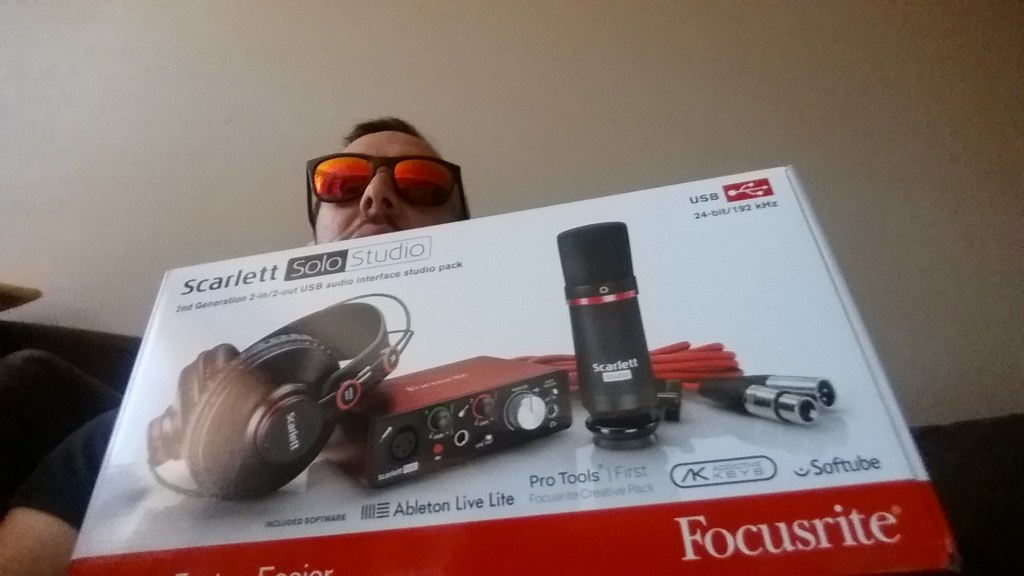
Okay officially there was no class this week but I am excited to present the very first time I’ve ever owned studio audio equipment so I can record my music on my laptop :). Before smart phones were a thing I used a tape/voice recorder and then later used my phone to record my little compositions; this took up a lot of space and didn’t allow for recording multiple tracks and all the other perks of audio programs. I picked up a ‘Scarlett Solo Studio” pack made by Focusrite, I first heard someone recommend it on a random YouTube video which I have since forgotten but I told myself it was a sign as it would help me do my Uni project and also help me achieve one of my long term goals of recording music (properly). It comes with the Scarlett audio interface, a large diaphragm condenser mic, headphones, XLR cable, Pro Tools, Ableton Live Lite and a bunch of plugins and loops. I’m really keen to see all aspects of this package in action, I was so excited that I didn’t even consider the fact that I don’t own a mic stand, but I won’t let that stop me!!!

09/10/2019 Ninth Day
Today was a seminar on the use of technology in the classroom in regards to a self managed website. The guest teacher had made an interactive website where students can select what they want to do in the lesson and they can slowly progress e.g. Garage rehearsal, The local gig, National Tour and International fame; each of these subjects had many components like listening, composing etc. The teacher said this method was introduced as a means of classroom management as the kids at her school were very unruly so explicit teacher through online tutorials seemed to be most effective. An idea that I got from this class was that differentiation can occur in an activity/task itself, you don’t need to have 3 separate tasks. We concluded the class by having an online scavenger hunt, answering musical questions and acquiring musical images utilizing gmail, google classroom, google docs, google drive. It was useful as I am not well versed in all these programs so as you can imagine I didn’t finish first 🙂

Oooh also got a link to an online version of an io808 drum machine (expensive in real life) though I have not worked out how to get sound from it yet I may one day https://io808.com/.
25/09/2019 Eighth Day
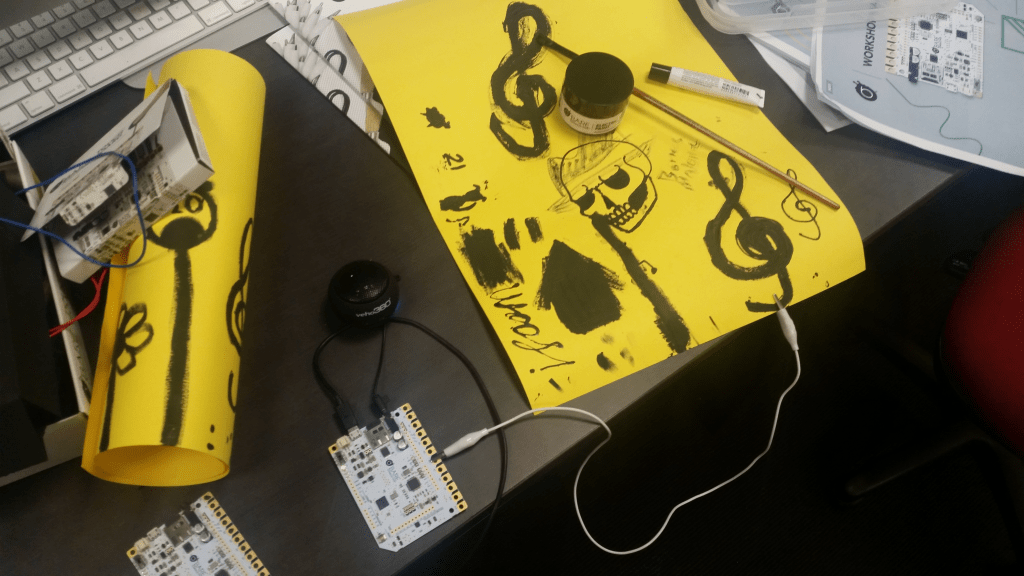
Talked about the ‘Maker Movement’ in music education. They are physical spaces where people can rent out and use industrial equipment inside. We had a similar set-up in class with work station, here is one station below.
I gave my ‘lift pitch’ which was a choice between two ideas.
- write and record a piece of music using digital devices that are completely new to me (everything is new to me), this would involve me buying a cheap audio interface and dynamic microphone to use with Soundtrap
- If I was able to accomplish this with relative ease I wanted to create a short story with audio using ‘tumult hype’
I chose this as it would help me in real-life as I always wanted to record on a music program and record multiple guitar tracks to be played simultaneously and have a song with all the instruments instead of just recording guitar parts on my phone and hoping that I remembered what I wanted to do with them later.
18/09/2019 Seventh Day
I was ill 😦 and did not get to experience the awesome class.
11/09/2019 Sixth Day
‘Gamification’ was the name of the game today (not literally) and I witnessed how we have come a long way since the days when I used to spend countless hours playing Sega Mega Drive and thinking the graphics were so real that my house was in fact being invaded by space aliens. There was a lot of discussion on the pros and cons of using games in music education and the research behind it; I personally am for it but not in the sense that students get rewards for progressing in games as I want them to have intrinsic motivation, I like to use it to make the learning process more fun and memorable. There were some websites that came up like http://rhythmdr.com, https://isleoftune.com, https://teachedm.com and https://learningmusic.ableton.com but honestly I wasn’t really into any of it, though I know that students would use them endlessly. I was more intrigued by https://www.coursera.org/learn/music-education as it allows you to do a heap of short courses on varying topics from leading universities AT YOUR OWN PACE!!!, ALL YEAR ROUND!!! AND ITS FREE!!! ……….unless you want a certificate at the end… but still I really think that’s cool and want to do a few short courses on the music business side of things. We discussed the effect of technology on the human brain and analysed some research and the consensus is not good … on that note I’d better do some mindfulness before this screen traps me in its matrix.

05/09/2019 Fifth Day
Set up a studio recording for piano performance and the interview after; this included 3 cameras, 2 lights, 2 mics, piano and performer. Had trouble finding the right audio level as there were extreme dynamics on the piano thanks to the ‘col pugno’ which I now know is an Italian music term for HULK SMASH!!. There was a fixed camera for the face shot, one for the hands/piano and one for action movement which Humbo was filming as he maneuvered through the set like a level 3 ninja mage with +3 to dexterity. The cameras/lights had to be rearranged to film the interview which was done without microphones but was not too difficult to manage and the only thing that followed was the dreaded pack up.

28/08/2019 Fourth Day
This lesson was divided into 2 parts where the first half was all about the lovely and complicated world of video editing. We used Screenflow for this task and learned about things like trimming, syncing audio, opacity, basic animation and non-destructive editing. I got the hang of it towards the end and with a bit or research it looks like it costs around $200 so it could be something I might get in the future. The next half was about copyright in music and how Australia’s is the worst going around. I had already known about these groups but refreshed my knowledge of APRA, AMCOS, ARIA and PPCA. There is no ‘fair use’ in Australia and after hearing the guest speakers I was concerned that I was going to be sued for royalties for singing songs in the shower; it really gave me the vibe that there’s very little chance of making money by becoming a proficient musician. I found out that APRA and AMCOS can collect royalties for you but you basically have to sign over your music rights to them so they are actually in control of the permission to use your music material …..yeaaaaaah No Thanks!!
I was going to embed a video here of me playing Jethro Tull’s ‘Aqualaung’ on Jazz flute, but due to the many possible copyright infringements instead here is a royalty and copyright-free image of from the awesome site Pixabay

21/08/2019 Third Day
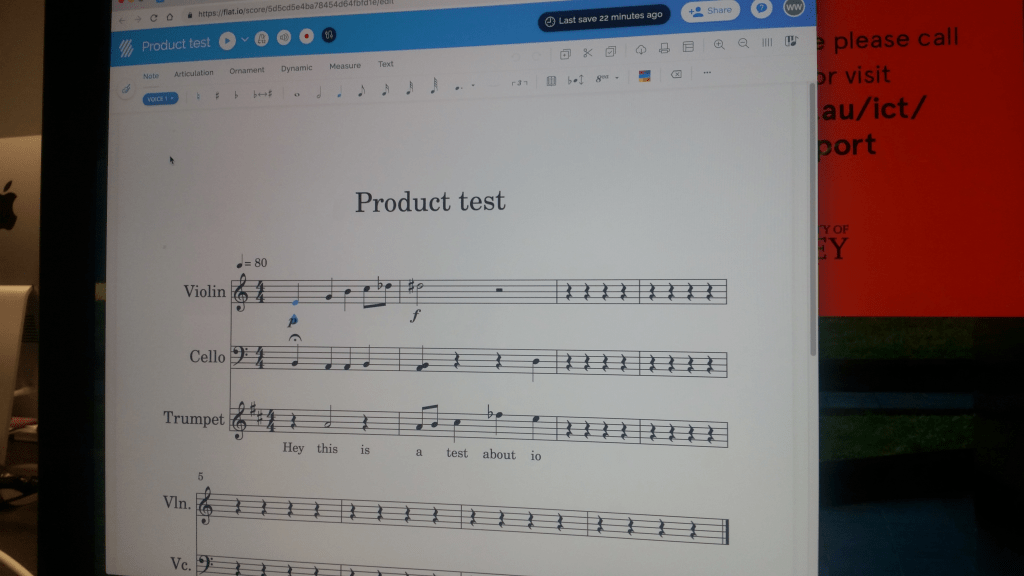
Today we discussed notation programs in great detail and I found out that Mr Humberstone was a Level 4 Technology Wizard who had been a Sibelius programmer for many years. We discussed programs like Noteflight, Flat io, Doric, Sibelius, Finale and Musescore with focus on their unique features, subtle nuances and ideal uses for them. I did a product review on Flat io which I thought was well designed for a school setting, it had all the necessary features a school student would need. I like it better as it had a ‘fixed’ ribbon system at the top as opposed to Noteflight which could change based on what had been pressed which was a cause for great annoyance when teaching a class using Noteflight (the memories still haunt me). Noteflight however did have a cool feature where you could upload a score to its database and if it had not been done before it would become part of its catalogue and people could download it and you would get paid royalties. A cool feature that I learned was an export video option that could be played with an online novel and also a mini screenshot option that was way quicker and simpler to use. Flat.io product test 😉
14/08/2019 Second Day
Today we did some audio/visual recording of a performance where to my surprise I would be one of the performers. I learned a lot about microphones, cameras, lighting and general things to look out for if you ever wanted to do a recording by yourself. There are condenser microphones that are awesome as they will pick up every nuance of a performance, their only downside is that they will pick up every nuance of a performance 🙂 so that means they can easily pick up environmental sounds like air conditioners and other performers which may over power your sound. Dynamic microphones are not susceptible to external sounds so are good for the stage but offer inferior sound quality compared to a condenser microphone which are preferred for studio recordings. We learned some basic camera set up tips, how to hold them and camera ‘composition’. You generally have a ‘fixed’ camera that captures all the action and other cameras to zoom in and out and to think about composition in the sense of capturing peoples faces how far away you are from them, the direction they are facing, the ‘story’ you are trying to tell. With lighting I learned that you could put filters over lights to reduce shadows and that top to bottom fluorescent lighting without external sunlight is the worst lighting you could get due to the shading it creates on people’s faces; getting lighting around eye level seems to be the go.

I shared this action shot below in a music education Facebook group (I’m not in it as I was one of the performers being recorded).

07/08/2019 First Day
07/08/2019 Wednesday the first day of Music Tech, looking forward to learning more about music technology, got some fundamentals under my belt in Soundtrap https://www.soundtrap.com creating our own tracks using: automation for fade ins, MIDI and manipulating MIDI files. Below you can see automation in the 4th track and a mixture of wave files and MIDI files; the track also features a custom made drum loop and also a custom made synth part using the MIDI keyboard interface at the end of the track. https://drive.google.com/open?id=1XYStddli5ZeR15TF9crhZ3z3BMuZ7FdN Here is the audio!

Learned a lot of Soundtrap mechanics and applied them which gave me a whole lot of creative ideas though I’m far from knowing how to implement all of them. I was shown the setup of instruments, mics and MIDI keyboards through to audio interfaces and then the device (which is most likely a computer) and can’t wait to start recording my guitar compositions into a music program and see what the program can do for me.
 JohnMuTech